GOING TO DISCORD: A RP GUIDE
GOING TO DISCORD, a roleplaying guide. this is just one of many different ways to discord rp. but hey, if you want to open up a discord rp set up the way i do- feel free to use this guide for your members :)the transition from discord from tumblr or twitter can seem daunting. here are some differences / learning curves that come to mind from my personal experience roleplaying — and hopefully they help you.the MOST IMPORTANT TIP is that regardless of how natural roleplaying elsewhere is to you now, remember that it was once brand new to you and there were probably some growing pains. discord roleplaying will be no different. give yourself some time to adjust and find your groove!(if you're a visual learner, i recommend starting at the EXAMPLE. tab)
MUSE ACCOUNTS - obviously, you'll need a discord account. you can choose to use your own personal discord or you can create a burner one if you're more of a private person. i've seen it done both ways!
but long gone are the days where you're cleaning out accounts or making new ones so that you can move onto a new group. no matter how many roleplays you join, you'll only need one discord.
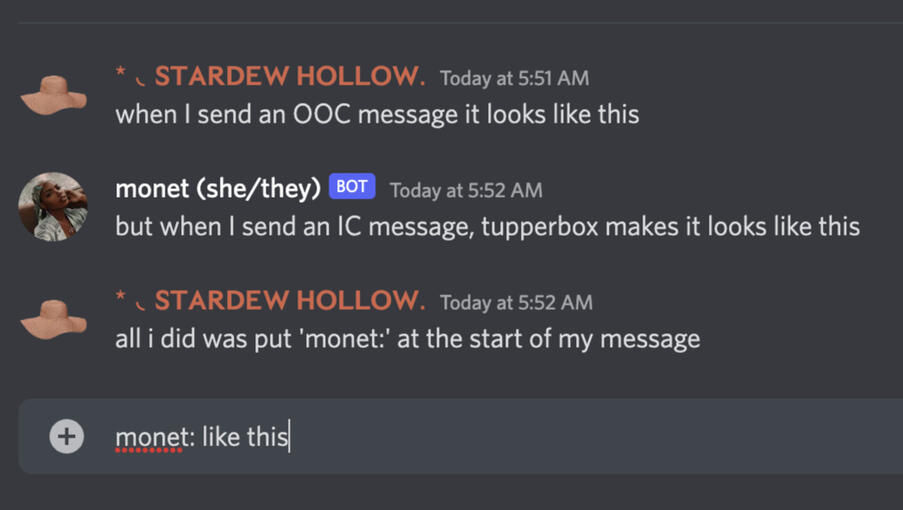
instead of dressing up a new discord account to reflect your character (like you would a twitter or tumblr account), you'll utilize a discord bot called TUPPERBOX that will allow you to send messages as your character.
WHAT IS TUPPERBOX? HOW DO I USE TUPPERBOX?
^ when clicking the link,
make sure you're logged into
a tumblr account
'DMS' AND 'TEXTS' BETWEEN CHARACTERS
there really isn't a way to completely mimic the way that DIRECT MESSAGES work on twitter rp.
in this regard, discord is similar to how tumblr rps do TEXTS via chat posts- though imo it's much simpler.
in a discord group, TEXTS are open for any mun to read if they want to. if you're from twitter rp, this is new for you- since twitter dms are always private.
CON: this is understandably a big adjustment and not knowing exactly what is going on in every dm is one of the fun parts of twitter and allows for more drama to brew quietly.
PRO: it discourages weird behavior, discourages bubble roleplaying, lets people know what your character is up to, and gives everyone a show to watch when the drama goes down.
REMEMBER: just case you can read it, doesn’t mean your character can. don’t blur ic and ooc- it's very easy to do if you aren't actively mindful of it!
ADDITIONALLY: if you really want a private dm / thread with a character no one else can read, you can opt to do it in a server of your own making.
SO HOW DO TEXTS WORK IN A DISCORD RP?
in our server, we have a category called TEXTS. the category has channels divided up by the alphabet.
every text between characters will be anchored to one of the channels in the category. every text will utilize the THREAD FEATURE implemented semi recently by discord.though the thread set up is not as simple as dming someone on twitter, they work the exact same once they are set up.it's easer than using chat posts on tumblr because you don't constantly have to delete what was said previously, making it completely accessible whether you're mobile or desktop.
a THREAD will automatically archive once they are inactive for a specific amount of time. when they archive, they ARE NOT deleted when this happens. archived threads can be revived or revisited easily! but when it automatically archiving threads...
CON: when they archive that means you have to go out of your way to find them. it's easy to do, but obviously it's less convenient than just having the dms be at the bottom of your list to revive at your leisure.PRO: less clutter when things are over. a thread you made one time that didn't last isn't just sitting there until you decide to delete it.